Your Mac App Grants Microphone Access — Then Forgets It Every Launch
GeekBye asked for microphone permission, you granted it, and it worked. Next launch: gone. And the app never showed up in System Settings → Microphone at all. The culprit was a macOS security feature quietly running the app from a path that disappears — here is the diagnosis and the one-prompt fix.
Here is a bug that makes you doubt your own eyes. You install GeekBye, it asks for microphone access, you click Allow, and transcription works. Great. You quit, reopen it the next morning — and it asks for microphone access again. You go to check System Settings → Privacy & Security → Microphone to fix it manually, and GeekBye isn't even in the list. Not denied. Not allowed. Just absent, as if it never asked.
Every individual piece looked correct. The prompt was real. The permission worked in the moment. The app was properly signed and notarized with the right usage strings. And yet the grant evaporated on every launch. GeekBye v2.0.6 fixed it — and the root cause is one of the sneakiest things macOS does to protect you.
The feature that was hiding the app from itself
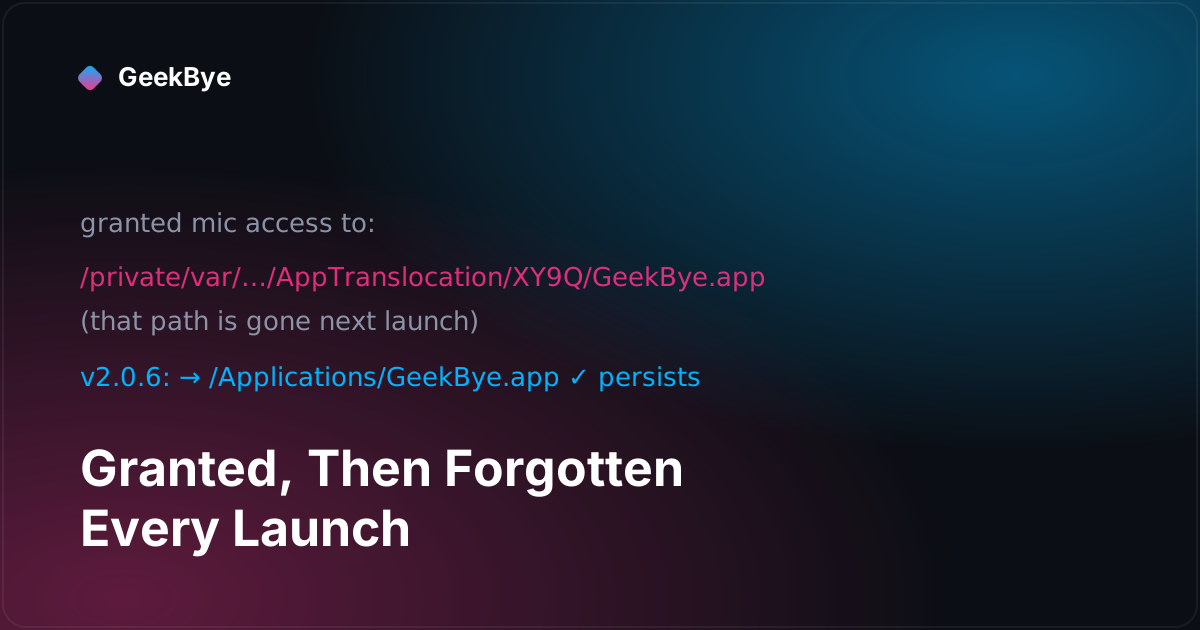
The culprit is macOS App Translocation, a Gatekeeper security feature. When you download an app and run it straight from the DMG or from your ~/Downloads folder — anywhere it's still "quarantined" — macOS doesn't actually run it from where you see it. It transparently copies it to a randomized, read-only path deep under /private/var/folders/.../AppTranslocation/… and runs that copy. It's a good defense: it stops a malicious download from tampering with files next to itself.
But here's the collision. macOS's permission system (TCC — the thing that tracks who can use your mic, camera, screen) identifies an app by its path and code identity. When the app is translocated, that path is random and temporary. So when you grant microphone access, macOS dutifully records the grant — against a path that won't exist next launch. Reopen the app, macOS translocates it to a different random path, sees an app it has no record of, and asks again. And because that phantom path is never a stable location, the app never earns a permanent row in System Settings → Microphone.
The app was granting permission to a ghost.
This is also why only some people hit it. If your copy of GeekBye already lived in /Applications — because you dragged it there, or because it got there via auto-update — there's no quarantine, no translocation, a stable path, and everything persists perfectly. The bug was invisible to us and to anyone past their first install, which is exactly the kind of bug that survives longest.
The fix: give the app a real home
Since the entire problem is an unstable path, the fix is to get the app onto a stable one. v2.0.6 detects when GeekBye is running translocated (or just running from outside /Applications) and offers a one-click "Move to Applications" — using the macOS relocation call that copies the bundle into /Applications and relaunches it from there. From that point on the app has a fixed identity: the microphone grant sticks, screen recording sticks, and GeekBye finally appears in System Settings where you'd expect.
The prompt is polite about it. It offers Move to Applications, Not Now, and Don't Ask Again — and it remembers the last choice, so the app never nags someone who has a deliberate reason to run it from elsewhere. The decision of whether to even show the prompt is isolated into small, pure functions (is this build translocated? is it outside /Applications? did the user suppress it?) so the logic is unit-tested without needing to launch a real notarized build on a real quarantined volume.
The same release also simplified the permission experience itself. GeekBye used to pop a custom, bespoke in-app permission window — a few hundred lines of UI trying to reproduce something the OS already does well. v2.0.6 deleted it and leaned on the native macOS permission prompt, backed by a quiet, non-blocking banner that appears only when a required permission is actually missing. Less code, and behavior users already recognize because every other Mac app works the same way.
The part I'm proudest of: we proved it before we believed it
It would have been easy to guess translocation and ship a fix. Instead, the release shipped a startup diagnostic first: on launch, GeekBye now reports its own executable path and whether it's translocated, whether it's inside /Applications, and the current microphone and screen permission status. That telemetry turned a plausible theory into a confirmed one — production data showed the affected sessions were, in fact, running from translocated paths outside /Applications, exactly as predicted.
That ordering matters. "Prompt appears but permission doesn't stick" has several possible explanations — a signing problem, a missing usage string, an entitlement issue, a TCC database quirk. We ruled the API-level causes out (the request path was demonstrably correct), then let real-world data point at the identity/path layer instead of shipping a hopeful fix and hoping the support tickets stopped.
Three things this bug teaches
- A permission that prompts but won't persist is an identity problem, not an API problem. If the request code is correct and the grant still vanishes, stop rewriting the request. Ask what path and code identity the OS is binding the grant to — and whether that identity is stable across launches.
- Ship the diagnostic with (or before) the fix. A few fields — where am I running from, what's my permission status — turned an educated guess into a verified root cause and told us exactly which users were affected. Instrument the boundary you suspect before you patch it.
- The bugs that hide from developers are the ones running in the "wrong" environment. Ours lived in
/Applicationson every dev machine, so the bug was structurally invisible to us while hitting first-time users. When a report doesn't reproduce, the first question is what's different about where it runs, not is the user mistaken.
GeekBye v2.0.6 shipped the relocation prompt and the diagnostic together. For the wider reliability arc this sits in, see what a version 2 actually takes (v2.0.0) and why screen recording captures the wrong monitor (v2.0.10) — another bug that only surfaced in a specific environment. For the small-details release next door, calm software: the flicker fix and the answer-mode chip (v2.0.3 + v2.0.5).